Irata - Space Colony: A Detailed Review and Download Guide
Screenshots


Introduction
Irata - Space Colony is a turn-based survival strategy game developed by Softaware Lab, designed for players who enjoy resource management and strategic planning in a sci-fi setting. In this immersive game, players find themselves on the frontier world of Irata-2, where they must build and manage a thriving off-world colony. The objective is straightforward yet challenging: grow your colony, maintain production, manage trade, and survive as many turns as possible. There is no definitive victory; instead, the focus lies in how long you can endure the challenges presented by the environment and resource demands.
Graphics & Gameplay
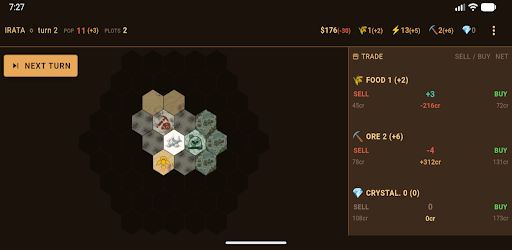
The graphics of Irata - Space Colony present a clean and visually appealing interface that complements its strategic gameplay. The game features a hexagonal map, centralizing around your Command Post, with various terrain types such as wetlands, dustplains, and ironpeaks. Each terrain type is distinct and plays a crucial role in the production of resources, from food to energy and ore. The color palette is vibrant yet appropriate for a space colony theme, allowing players to immerse themselves in the environment.
Gameplay revolves around turn-based mechanics where players claim land, construct buildings, and manage resources. The HUD (Heads-Up Display) effectively tracks essential resources like food, ore, energy, credits, and crystite. Players must strategize their moves to expand their colony while keeping an eye on resource production and market fluctuations. The dynamic market system ensures that players must adapt their trading strategies based on supply and demand, adding an extra layer of complexity to the gameplay. Random events also introduce unpredictability, challenging players to think on their feet as they navigate through each turn.
Key Features
- Turn-Based Strategy: Engage in a strategic gameplay style that requires careful planning and decision-making.
- Hex Map Expansion: Claim and develop plots of land around your Command Post, with a focus on maximizing resource production.
- Resource Management: Keep track of various resources like food, ore, energy, and credits. Players must balance production and trade to ensure their colony's survival.
- Building Options: Construct various buildings such as Agri-Domes for food production, Power Arrays for energy, Drill Rigs for ore extraction, and Crystite Extractors for additional income.
- Dynamic Trading System: Engage in trading food and ore on the local market, with prices that fluctuate based on player actions.
- Random Events: Experience unpredictable events that can impact your colony, requiring adaptability and quick thinking.
Mod Features
For players looking to enhance their gaming experience, here are some plausible mod features that could be introduced:
- Premium Unlocked: Access all premium features without the need for in-game purchases, allowing players to enjoy the full range of capabilities from the get-go.
- No Ads: Enjoy uninterrupted gameplay by eliminating all advertisements, providing a smoother experience.
- Unlimited Money: Gain unlimited credits and resources, enabling players to build their colonies without worrying about resource management constraints.
- Enhanced Graphics: Upgrade the visual elements of the game, offering improved textures and animations for a more immersive experience.
- Custom Scenarios: Create and share custom survival scenarios that challenge players to think creatively and strategically beyond the standard gameplay.
How to Install APK on Android
Installing the Irata - Space Colony APK on your Android device is a straightforward process. Follow these steps to get started:
- Download the APK: Click on the download link provided below to obtain the Irata - Space Colony APK file.
- Enable Unknown Sources: Go to your device's Settings, then navigate to Security or Apps & Notifications. Enable Install unknown apps for the browser or file manager you will use.
- Locate the APK: Open your file manager and navigate to the Downloads folder (or wherever your APK file is saved).
- Install the APK: Tap on the APK file to begin the installation process. Follow the on-screen instructions to complete the installation.
- Launch the Game: Once installed, you can find the Irata - Space Colony icon on your home screen or app drawer. Tap to launch and start your colony-building adventure!
Call To Action
Ready to embark on an exciting journey of survival and strategy in Irata - Space Colony? Download the APK now and see how long you can survive in this challenging and engaging game! Click here to get started!